Video Background Changer
Happy CoderBeauty
3.038.00 Reviews
- Version
- 3.2.0
- Installs
- 100.00K
- Age Rating
- Everyone
Screenshots
Our Review of Video Background Changer
 Analysis by Appyee
When a background replacement looks uneven, I wouldn’t immediately blame the whole app. In my experience, this kind of edit depends on the source video as much as the tool: a subject that blends into the original setting, fast movement, or dim light can make separation less convincing. I’d start with a short clip in clear light and a subject whose outline is easy to distinguish. That gives me a fair test before I spend time on a longer edit.
Where the first attempt can go wrong
The most frustrating result is often a rough edge around hair, sleeves, or a moving hand. Those details change shape from frame to frame, so a replacement can look less natural even when the person remains recognizable. I treat the preview as a check for obvious problems, not a guarantee that every frame will be perfect. If the edge looks distracting there, I choose another clip or background rather than expecting a later save to fix it.
Background choice matters too. A busy image can compete with the person on screen, while a similar color behind the subject can make the cutout harder to read. For a quick greeting or a simple product clip, I’d pick a calm image with clear contrast and keep the subject away from the edges of the frame. That small choice can make the result feel more intentional without adding extra editing steps.
Simple checks before editing
Before choosing a video, I check that it plays normally in the phone’s gallery and that I have selected the intended clip. If the picture is already very dark or the subject is partly hidden, I use a better source rather than trying to rescue it with a background swap. I also decide what the video is for first: a casual joke can tolerate a visible cutout, while a business post may need a cleaner source and a more restrained background.
For a custom image, I use a picture that suits the clip’s framing and tone instead of assuming any image will work equally well. A portrait video paired with a landscape scene can look odd if the scale and perspective do not match. I try a simple background first, review the preview, and only then experiment with something more detailed. This keeps the choice focused on readability, not just novelty.
Recovering a workflow that stalls
If a result looks wrong, I make one change at a time. I might test a brighter clip, switch to a less complicated background, or shorten the section I’m evaluating. Changing several things at once makes it harder to tell what helped. I also keep the original video available until I’m satisfied with the replacement, so I can return to the source instead of treating a rough first pass as final.
If the app seems slow or an edit does not finish, I avoid repeatedly starting the same job. I first check whether the clip itself plays and whether the phone has enough room to handle another edited file. Then I try again with a shorter video. These are ordinary troubleshooting steps, not a promise that every delay comes from the app; they simply help narrow down where the friction may be.
When another tool makes more sense
Video Background Changer is most appealing when I want a direct background swap without learning a full video editor. It is less suited to a project that needs precise edge cleanup, detailed color correction, layered titles, or careful sound editing. A broader editor is a better fit for that kind of work, while a still-photo background tool cannot replace a moving-video workflow. I’d choose according to the job rather than expecting this app to cover every part of production.
It is also not my first choice when a clip has complicated motion or when the background must look completely natural in every frame. For a polished advertisement, a controlled recording setup or a more capable editing workflow is safer. For a quick social post, a playful greeting, or a rough concept preview, a small imperfection may be an acceptable trade-off for getting the idea across quickly.
Have you ever wished you could change the background of your videos just like that? Well, with the Video Background Changer, it's not only possible but incredibly easy. I recently took a dive into this app, and let me tell you, it's a game-changer for anyone looking to spice up their video content without the fuss of complicated editing software.
Getting Started with Video Background Changer
The first thing that struck me was how user-friendly the Video Background Changer is. I mean, I’m no tech wizard, but even I found it super intuitive. From the moment you open the app, you’re greeted with a clean interface that invites you to either capture a new video or upload one from your gallery. No unnecessary frills here, just straight to the point.
Exploring Features
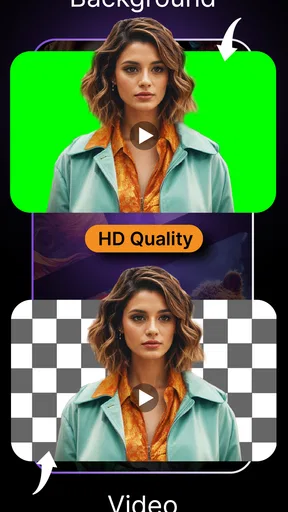
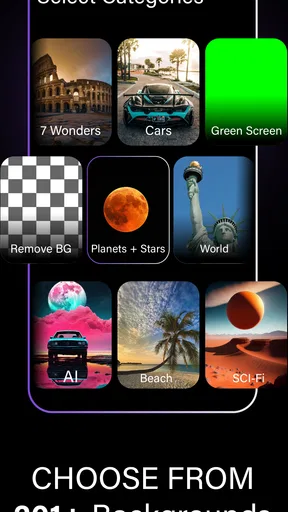
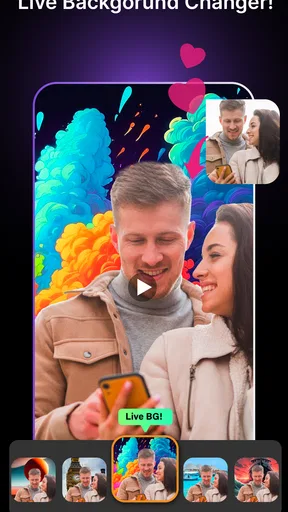
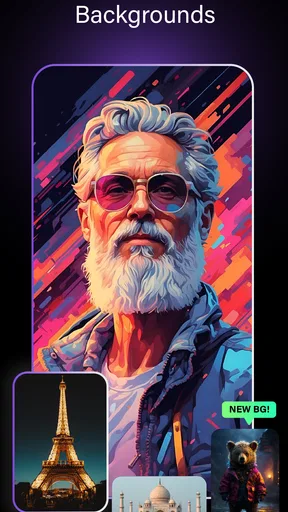
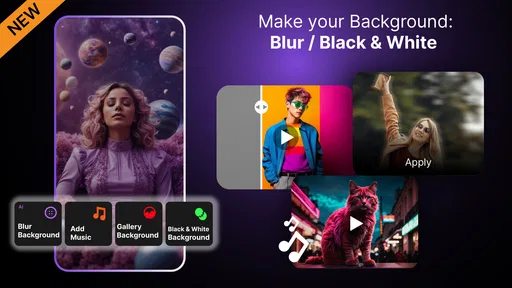
Now, let’s get into the nitty-gritty. The app offers a variety of backgrounds to choose from, ranging from serene landscapes to bustling cityscapes. What’s cool is that you can also upload your own images to use as backgrounds. This feature is perfect if you want to add a personal touch or brand-specific imagery to your videos.
One of the standout features is the real-time preview. You can see how your video looks with the new background before you hit the save button. This means no more trial and error; you get exactly what you envision right away. Plus, the background change happens in a snap, thanks to some nifty AI technology working behind the scenes.
Performance and Usability
I tested the app on both Android and iOS, and it runs smoothly on both platforms. The processing time for replacing backgrounds is impressively quick, even for longer videos. I did notice that the app performs best with videos shot in good lighting. In dim lighting, the app sometimes struggles to cleanly separate the subject from the background.
While the app is straightforward, it would be even better if there were a few more customization options, like adjusting the intensity of the background blur or adding filters directly within the app. But hey, for a free tool, it’s already packing a punch.
Who is it For?
Whether you’re a content creator, a small business owner, or just someone who loves making fun videos, this app is a must-try. It’s particularly handy for those who don’t have access to high-end editing software but still want professional-looking results. The app makes it easy to create engaging content that stands out on social media platforms.
Everyday projects that suit it
I can see the appeal when I want to turn an ordinary clip into something more presentable without building a full edit around it. Imagine recording a short update at home before a call, then realizing the room behind you is cluttered. I’d try a quieter replacement image, preview the result, and use the edited clip if the outline stays clean. That is a practical, low-stakes job where speed matters more than frame-by-frame control.
It can also help with a small shop’s quick product announcement, a birthday greeting, or a playful video sent to friends. For a business post, I’d use a background image that supports the subject rather than one that draws attention away from it. I would not count on it as a complete branding suite: the useful role here is changing the scene behind the video, then taking the finished clip into another tool if the post needs titles, music, or more elaborate finishing.
Questions I would settle before relying on it
Can I use my own background? Yes, the app supports uploading an image, which is useful when a generic scene does not fit the message. I’d prepare that image before editing and check that its orientation makes sense beside the video. If the picture feels mismatched, I’d try a simpler choice rather than forcing the custom image into the composition.
Is it a replacement for a full editor? I wouldn’t treat it that way. The focused workflow is its advantage when I only need a background change; it becomes a limitation when I need several kinds of precise adjustments in one project. And should I expect every source video to work equally well? No. As with the lighting issue noted above, a clear subject and readable outline give the effect a better chance than a dark, crowded clip.
Who should try it—and who should pass
Happy Coder’s beauty app is free to install and is rated for Everyone, so it is easy to consider for casual editing. It has an average rating of 3.0 from over 800 ratings and has been installed more than 100,000 times. I read that as a reason to approach it with realistic expectations: it has found an audience, but it is not a guaranteed fit for every phone, clip, or standard of finish. The current version is 3.2.0, and it runs on Android 7.0 and later.
I’d recommend giving it a try if you want a focused way to replace a video background and are comfortable checking the result before sharing. I’d skip it if your work depends on exact cutout edges, extensive controls, or a consistent studio-quality finish. The app is free, though in-app purchases range from $6.49 to $54.99 per item, so I would look carefully at any purchase prompt and decide whether the extra spend fits the job before proceeding.
My practical verdict
For me, the clearest reason to use this app is its narrow purpose: choose a clip, try a different setting, and judge the result in a preview. That is more approachable than opening a full editor when all I want is a quick visual change. Its trade-off is just as clear: lighting, contrast, movement, and background choice affect how believable the separation looks, and the app does not replace detailed editing tools.
In conclusion, the Video Background Changer app is a fantastic tool for anyone looking to spruce up their video content with minimal effort. It’s user-friendly, efficient, and delivers on its promises. While there’s room for a few more advanced features, its simplicity is part of its charm. So, go ahead and download it; you might just find yourself spending hours experimenting with different backgrounds and creating videos that pop!
Happy editing!
Verdict
Strengths of Video Background Changer
- Easy to use interface for quick edits.
- Offers a variety of video background options.
- Supports multiple video formats.
- Allows real-time previews before saving.
- Includes basic editing tools for enhancement.
Limitations of Video Background Changer
- Limited advanced features for professionals.
- Occasional ads can interrupt workflow.
- Requires internet for some features.
- May experience lag on older devices.
- Limited free version capabilities.
Similar Picks in This Category
View All
Beauty Makeup Editor & Camera
Photo & Video Editors - Instant Solution4.7

Perfect365: Face Makeup Editor
Perfect365, Inc.3.5

Mirror Plus - HD Mirror app
Digitalchemy, LLC4.8

Cute Lock Screen & Wallpapers
Prometheus Interactive LLC4.6

HD Camera for Android
One Music Player4.5

Phone Mirror app - True Mirror
Cards4.6
Frequently Asked Questions
What is Video Background Changer and how does it work?
Video Background Changer is an app that allows users to replace or modify the background of their videos without the need for a green screen. By utilizing advanced algorithms, this app detects the subject in a video and separates it from the background, enabling users to overlay a new scene or image seamlessly. This is perfect for creative projects or enhancing video presentations.
Which devices are compatible with Video Background Changer?
The app is designed for both Android and iOS platforms. It requires a relatively modern device with sufficient processing power and memory to handle the video editing processes. Ensure your device’s operating system is up to date to guarantee compatibility and optimal performance when using the app.
Does Video Background Changer support all video formats?
Video Background Changer supports a wide range of popular video formats, including MP4, MOV, and AVI. However, for the best results and smoother editing experience, it's recommended to use videos in MP4 format. If your video is in a different format, consider converting it before using the app.
Are there any in-app purchases or subscriptions required?
While Video Background Changer offers a free version with basic features, there are optional in-app purchases available. These purchases may include access to premium backgrounds, advanced editing tools, and the removal of watermarks. Users can also opt for a subscription model to unlock all features and updates.
How user-friendly is Video Background Changer for beginners?
Video Background Changer is designed with user-friendliness in mind, featuring an intuitive interface that guides users through the editing process. Beginners can easily navigate through its features, and the app includes tutorials and tips to assist new users in getting started. With practice, users can quickly enhance their skills in video editing.
